 Family Buddy
Stop saying it for the twentieth time this morning
Make bed, brush teeth, pack school bag, written down once, so the list does the nagging instead of you. It comes back every day on its own, and your child works down the same one as yesterday.
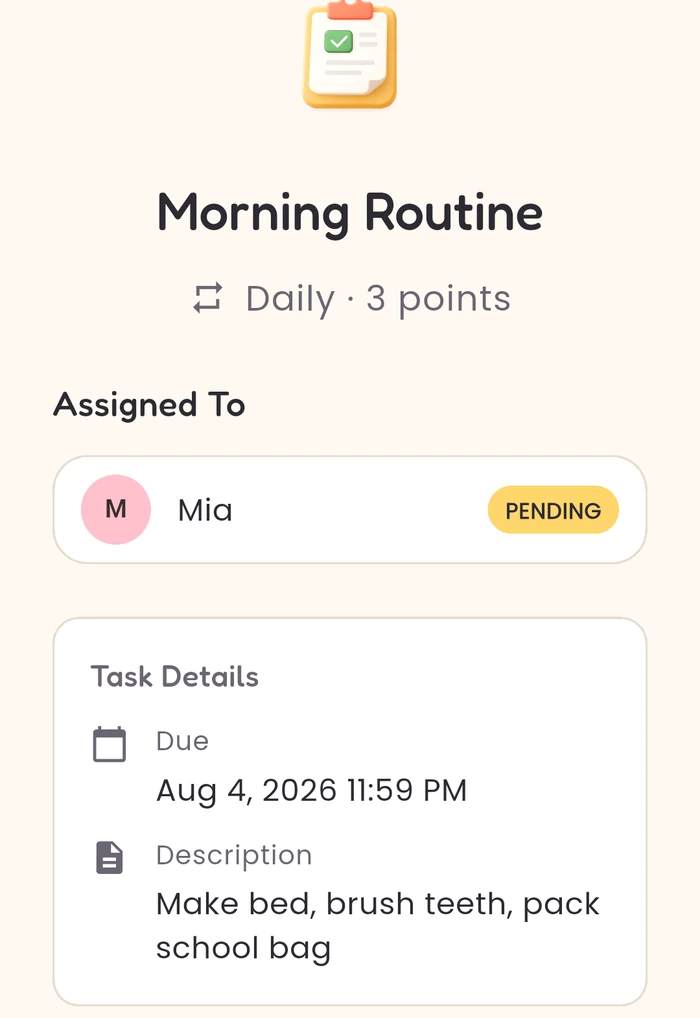
One routine, all the steps, repeating daily.
Set it up tonight, and tomorrow morning runs itself
- Add your child.
- Create one task called Morning Routine and set it to repeat daily.
- Write the steps into it: make bed, brush teeth, pack school bag.
- Give it a point value. Three is a reasonable morning.
That’s the whole setup. Tomorrow it appears on its own, and the morning after that, without you touching it again.
Why writing the steps down changes the morning
Most morning arguments aren’t about the tasks. They’re about relitigating the tasks: whether teeth come before or after the bag, whether it counted, whether today is different. A list that was agreed last night isn’t up for discussion at 7am, and it gives you something to point at instead of repeating yourself.
Best for
parents whose hardest 45 minutes of the day are between waking up and the front door.
Not for
parents who want the app to nag the child directly. You mark tasks off; the list gives you something to point at instead of repeating yourself.
Questions about mornings
My child refuses to brush their teeth. Can Family Buddy make the routine easier to follow?
It can make the routine consistent and visible, which is not the same as making brushing happen. Put brushing teeth on the morning and evening routine with the points agreed up front, and it appears every day without being re-added. You decide whether it's done and award the points. Family Buddy can't tell whether teeth were actually brushed properly. That still needs you, especially with younger children.
How do I stop repeating the morning routine every day?
Write it down once. Make bed, brush teeth, pack school bag, written into one daily task with the points you've agreed, and it appears again each morning without you re-entering anything. With Premium you can print the list for the fridge, so it's visible all day with no screen involved. Family Buddy doesn't send reminders and doesn't nag on your behalf. It removes the need to re-explain what the morning involves, because the list already says it.
How do I set up a morning routine on the free plan?
Make it one task, not three. Create a daily task called “Morning routine” and put the steps in its description: make bed, brush teeth, pack school bag. That’s the one daily routine the free version covers, and it comes back every morning on its own. Adding the steps as three separate daily tasks is what runs into the free limit.
What happens if we miss a morning?
Nothing breaks. The routine reappears the next day either way, and you decide whether to award the points. Family Buddy doesn’t mark anything late, doesn’t send a reminder and doesn’t chase your child. A missed day is just a day you didn’t tick it off.


You’ll land on “Family Star”. That’s us. We’ve renamed to Family Buddy, and the App Store listing is still catching up.
Free covers one child and one daily routine. The morning list is the one most parents set. Premium adds unlimited daily routines.
Appointments and school trips as well as the routine? See what’s on this week →
Want it on the fridge instead of a phone? Print the daily list →
Want the points to add up to something? Rewards agreed before she asks →
Family Buddy has no account and no sign-up. How your family data is handled →