 Family Buddy
A kids chore chart that keeps itself up to date
Family Buddy is a chore chart that lives on your phone. You set the tasks and what each one is worth, tap to award points, and the total climbs toward rewards you choose. When it changes, you edit a line instead of redrawing the whole thing.
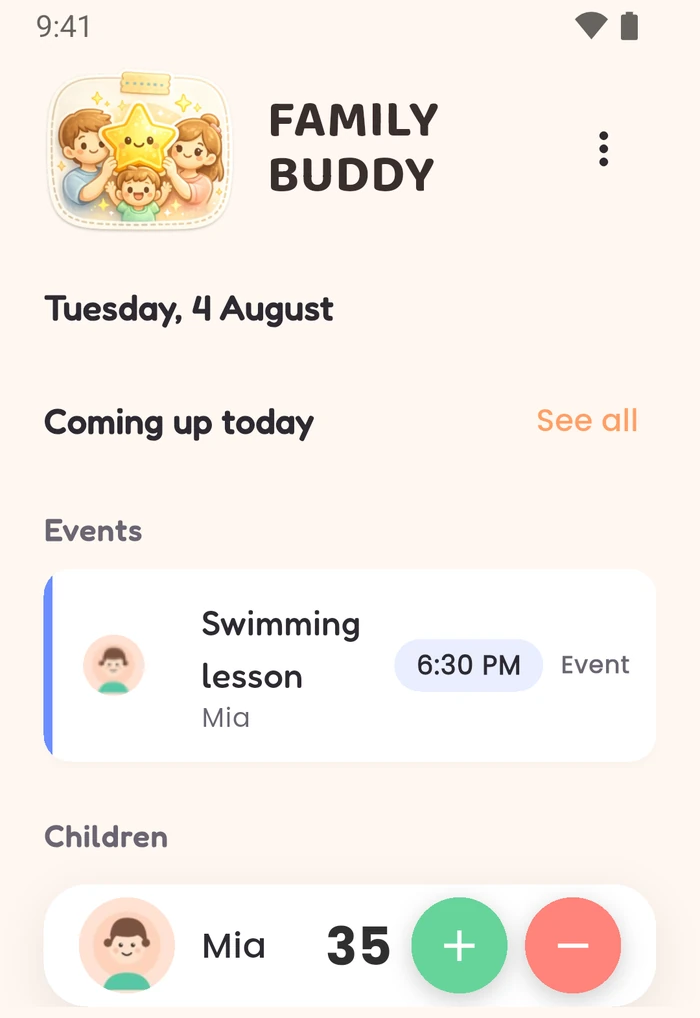
Points, today’s list and the running total on one screen.
Why paper charts stop getting updated
A star chart on the fridge worked. For about two weeks. Then a task changed and the whole grid needed redrawing, half the stickers went missing, and nobody was quite sure who was ahead. The chart didn’t fail because the idea was wrong. It failed because keeping it current was a job nobody had time for. ↳ visible only, no twin. The strongest line on the page and the full stop helps it.
| On the fridge | On your phone |
|---|---|
| Redraw it when anything changes | Edit one line |
| Stickers run out, and so does the enthusiasm | The running total is always right there |
| You made the reward up on the spot | You set what it takes, before anyone asked. |
What you actually set up
- The tasks, and how many points each one is worth.
- The rewards, and what each one takes in points.
- That’s it. Your child never needs a device or an account.
Still want it on the fridge? Premium prints the day’s list and the rewards catalogue, so the chart stays visible all day with no screen involved at all.
Best for
parents who've had a paper star chart on the fridge and watched it stop being updated somewhere around week three.
Not for
parents wanting an app their child uses alone. This is the parent's app: your child never needs a device or an account.
Questions about the chart
My child won't put toys away. How can I make tidying up part of the routine?
Add tidying up as a daily task and agree what it's worth before you start. Two points, say. It comes back on the list every day without you re-entering it, so it stops being a fresh negotiation each evening and becomes one of the things already agreed. You mark it done and award the points. Family Buddy won't make your child tidy up. What it changes is that the expectation and what it earns were settled in advance instead of in the moment.
How do I make a chore chart work when we stop updating it after a week?
Most paper charts stop because keeping them up to date becomes its own chore. Daily tasks here come back on their own, so there's nothing to redraw. The upkeep is marking things off and awarding points. Start with fewer tasks than you think you need: a short list you keep beats a complete one you abandon. The free version covers one child and one daily routine, which is usually about the right size to start with.
What's the difference between a daily task and a one-off?
A daily task comes back every day without being re-added. That’s the routine. A one-off happens once and then it’s done, which suits “help carry the shopping in” or “tidy the playroom before Grandma comes”. One-off tasks are free and there’s no limit on how many you create.
Do I have to mark things off at the moment they happen?
No. You can tick several things off at once later in the day. The app isn’t watching the clock and nothing expires while you’re not looking. You award the points when you award them.


You’ll land on “Family Star”. That’s us. We’ve renamed to Family Buddy, and the App Store listing is still catching up.
Want the chart on the fridge as well? Print the daily list →
Mornings the hardest part? Set up one morning routine →
Family Buddy has no account and no sign-up. How your family data is handled →